Choose Zapier when you want simple automations running quickly and you do not have a developer. Choose n8n when your workflows have many steps, need custom logic or AI agents, or when you want to host the platform yourself. Both connect your apps and both can call AI models. The difference is how much control you get and how the cost grows as your workflows get longer.
n8n vs Zapier at a glance
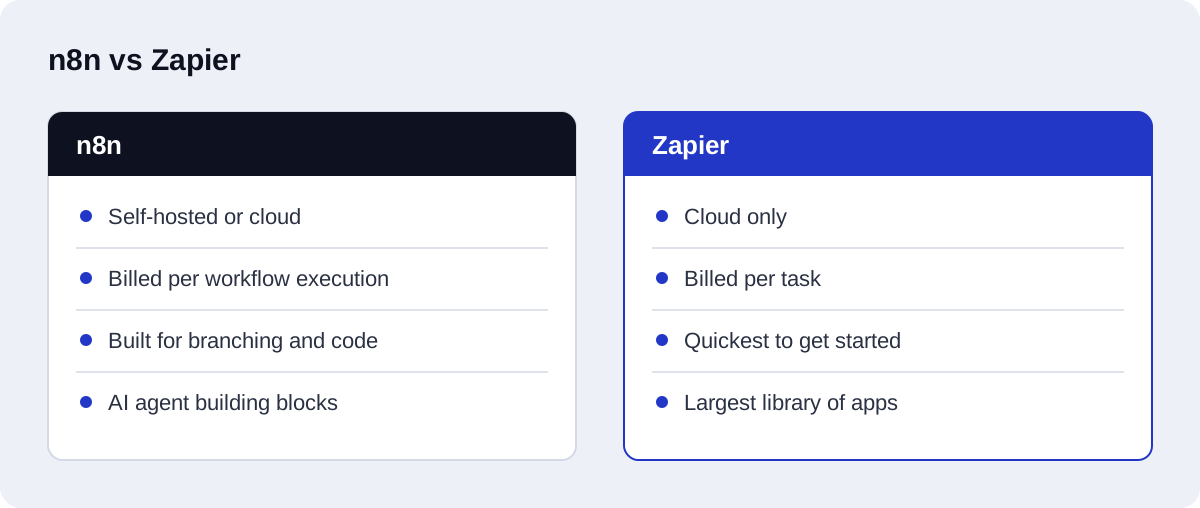
| n8n | Zapier | |
|---|---|---|
| Hosting | Self-hosted or n8n's cloud | Cloud only |
| Source code | Source-available, can be self-hosted | Proprietary |
| Pricing model | Based on workflow executions | Based on tasks (each action step counts) |
| App integrations | Built-in nodes, plus any API through HTTP requests | A very large library of ready-made app integrations |
| Custom code | JavaScript and Python inside workflows | Limited code steps |
| Branching, loops, error handling | Built for it | Possible, but gets awkward as flows grow |
| AI agents | Built-in AI agent, tool, memory, and vector store nodes | AI steps and agent features inside the platform |
| Learning curve | Steeper | Gentle |
Pricing and features on both platforms change often. Check each vendor's pricing page before you commit.
Where Zapier is the better choice
Zapier is easy to start with. If the automation is "when a form is submitted, add a row to a sheet and send an email", a non-technical person can build it in minutes and it will keep running.
Zapier also has the larger library of ready-made integrations. If you rely on a niche app, there is a good chance Zapier already supports it.
Pick Zapier when:
- the workflows are short and linear
- nobody on the team writes code
- the app you need has no public API you want to deal with
- volume is low enough that per-task pricing stays small
Where n8n is the better choice
n8n is built for workflows that branch, loop, retry, and call code. That is exactly what AI automation looks like once it leaves the demo stage.
Cost on long workflows. Because n8n's pricing is tied to executions of a whole workflow, a workflow with fifteen steps is counted once. On a per-task model, the same workflow consumes many tasks every time it runs. For multi-step AI workflows this difference adds up quickly.
Self-hosting. You can run n8n on your own server. That keeps data inside your infrastructure, which matters for teams with privacy or compliance requirements, and it removes platform fees apart from hosting.
AI agent building blocks. n8n has nodes for AI agents, tools, memory, and vector stores, so an agent that looks things up in a knowledge base and then calls your CRM can be built as one visual workflow. The n8n documentation describes these nodes. If the terms are new, we explain agents in AI agent vs chatbot and knowledge-base lookup in what a RAG chatbot is.
Real error handling. Dedicated error workflows, retries, and conditional branches make it practical to build the validation and fallback steps that AI workflows need.
Pick n8n when:
- workflows have many steps or run at high volume
- you need custom logic, API calls, or code
- you are building AI agents or RAG-based steps
- you want to self-host or control where data goes
How each platform is priced
We do not quote either vendor's prices here, because they change. What stays useful is the unit each one charges for.
n8n charges by execution. On n8n's cloud service, pricing is based on workflow executions, and one run of a whole workflow counts once regardless of the number of steps inside it. See the n8n pricing page for current plans.
Zapier charges by task. Each successfully completed action uses a task. Filters and formatters do not use tasks. See the Zapier pricing page for current plans.
| n8n cloud | Zapier | |
|---|---|---|
| Unit you pay for | A workflow execution | A task |
| What counts as one unit | One full run of a workflow, whatever its length | Each action that completes successfully |
| What does not count | Extra steps inside the same run | Filters and formatters |
| Adding a step to a workflow | Does not change the count | Adds a task per run if the step is an action |
| What makes the bill grow | More runs | More runs, and more actions per run |
To estimate your own usage, take one workflow and count two numbers: how often it runs in a month, and how many action steps it has. On an execution model, only the first number matters. On a task model, you multiply them, leaving out filters and formatters.
That is why the two models favour different shapes of work. Many short automations that each do one or two things are a natural fit for task pricing. A few long workflows that run often are a natural fit for execution pricing.
One cost is the same on both: the language model. Model providers bill by tokens processed, separately from the automation platform.
Where Make fits
Make is a third hosted option that often appears in the same comparison. It is a hosted platform built around a visual scenario builder, where you lay out an automation as connected modules on a canvas.
We describe it only in general terms, because we have not built enough on it to compare its features or plans fairly. If you are weighing n8n vs Make, or Zapier vs Make, apply the same tests used in this article:
- What unit does it charge for, and how does that unit grow with your longest workflow?
- Can it be self-hosted, if that matters to you?
- How does it handle branches, retries, and failed steps?
- Does it support the apps you already use?
Check Make's own documentation and pricing page for the current answers.
Self-hosting tradeoffs
Self-hosting is n8n's most distinctive option, and it is not free of cost. n8n is source-available under a fair-code license called the Sustainable Use License, which you can read in the n8n repository. It is not a standard open-source license, so read its terms if you plan to do more than run n8n for your own business.
What you gain:
- Data stays on your server. Workflow data does not pass through a third-party automation cloud.
- No per-execution platform fee. You pay for the server.
- Control. You decide when to upgrade and what the instance can reach on your network.
What you take on:
- Updates. Someone has to apply new versions and check that workflows still run.
- Backups. Workflows and stored credentials need to be backed up and the restore tested.
- Security. The server, its access, and the credentials it holds are your responsibility.
- Uptime. If the server stops, every workflow stops, and nobody will tell you unless you set up monitoring.
A small business with no technical staff should usually start on a hosted plan. Setting up and maintaining a self-hosted instance is part of our n8n automation services.
Error handling
AI workflows fail in two ways, and the platform has to help with both.
Loud failures. An API is down, a credential expired, a request timed out. The step reports an error. What you need is a retry for temporary problems, an alert when retries run out, and a record of the input so the run can be repeated.
Quiet failures. The language model returns an answer, the step succeeds, and the answer is wrong: a category that is not on your list, a missing field, text where a number should be. No platform catches this for you. You have to add a validation step that checks the model's output against rules, and a branch that sends failures to a person.
On n8n, the pieces for this are part of the normal toolkit: conditional branches, retries on a node, and a separate error workflow that runs when another workflow fails. On Zapier, error handling is possible, and because filters do not use tasks, a validation check built as a filter does not add to the count. In our experience it becomes harder to follow as the number of branches grows.
What about AI workflows specifically?
An AI workflow is rarely one step. A realistic lead-handling flow looks like this: receive a webhook, clean the data, ask a language model to classify the enquiry, validate the model's output against rules, look up the contact in the CRM, create or update the record, notify the right person, and log the result. If the model returns something unexpected, the flow has to catch it and route the case to a human.
That is eight or more steps with a branch and an error path. It can be built on either platform. On n8n it is one execution and the branching is natural. This is why most of the AI automation we build for clients uses n8n, or Python when the logic is heavy enough to deserve its own service.
A worked example: the same AI workflow on each platform
Take a smaller version of that flow. A sales team wants every website enquiry classified and logged in the CRM, with the salesperson notified.
On Zapier
- Trigger: a new form submission.
- Formatter: tidy the name and phone number. Formatters do not use a task.
- AI step: classify the enquiry and extract the company and need. One task.
- Filter: continue only if the category is one of the allowed values. Filters do not use a task.
- Action: find or create the contact in the CRM. One task.
- Action: send the notification. One task.
- A separate path or a second Zap handles enquiries that failed the filter.
Each run uses a task for every action that completes. A non-technical person can build the main path. The failure path is the part that takes care.
On n8n
- Webhook node receives the form submission.
- A data step cleans the fields.
- An AI node classifies the enquiry and returns structured output.
- An IF node checks the output against the allowed values.
- On the valid branch: look up the contact, create or update the record, send the notification.
- On the invalid branch: send the case to a person with the original message attached.
- An error workflow alerts the team if any node fails.
The whole run is one execution, including the failure branch. It takes more knowledge to build, and everything is visible on one canvas.
Neither version is wrong. If this is the only workflow you need and nobody on the team is technical, the Zapier version is a reasonable choice. If it is the first of several, or you expect to add steps, the n8n version will cost less to grow. This kind of lead flow is the core of AI-driven CRM automation.
n8n vs Zapier vs custom Python
There is a third option. When the logic becomes complex, the volume is high, or the workflow needs careful testing, a small Python service is often simpler to maintain than a very large visual workflow.
| Use | When |
|---|---|
| Zapier | Short, linear automations between popular apps |
| n8n | Multi-step workflows, AI agents, webhooks, self-hosting |
| Python (for example FastAPI) | Heavy logic, high volume, retrieval pipelines, anything that needs unit tests |
The three combine well. A common setup is n8n for orchestration and a Python service for the parts that need real code.
Can you move from Zapier to n8n later?
Yes, but workflows do not transfer automatically. Each Zap has to be rebuilt as an n8n workflow. It is a good moment to remove steps nobody needs and to add the error handling that was missing. If you expect to outgrow simple automations within a year, starting on n8n avoids the rebuild.
A migration goes more smoothly in this order:
- List every Zap. Note what triggers it, what it does, how often it runs, and who depends on it. Our guide to mapping your operations for AI workflow automation gives a format for this.
- Sort them. Short, stable Zaps that cost little can stay where they are. Long, high-volume, or fragile ones are the candidates.
- Check the integrations. For each app, confirm n8n has a node or that the app has an API you can call with an HTTP request.
- Rebuild one workflow first. Pick one that matters but is not critical. Add validation and an error path while you rebuild it.
- Run both in parallel. Compare the results on real data before switching, taking care that actions such as emails are not sent twice.
- Switch and turn off the Zap. Keep it paused, not deleted, until the new workflow has run cleanly for a while.
- Move credentials and document. Reconnect each account in n8n and write down what each workflow does.
You do not have to move everything. Running both platforms side by side, each on the work it suits, is a normal end state.
How Axenor AI uses them
We build most client workflows in n8n or Python, connect them to the tools the team already uses, and add validation, fallback, and documentation so the workflow can be maintained without us. If you already run on Zapier and it works, we will tell you to keep it. Read more on our AI workflow automation page, or see how much an AI agent costs to build.
If you are new to this, AI workflow automation for small and medium businesses is the place to start. If you want a second opinion on which platform fits your workflows, that is part of our AI automation consulting, and you can book a free automation audit to begin.