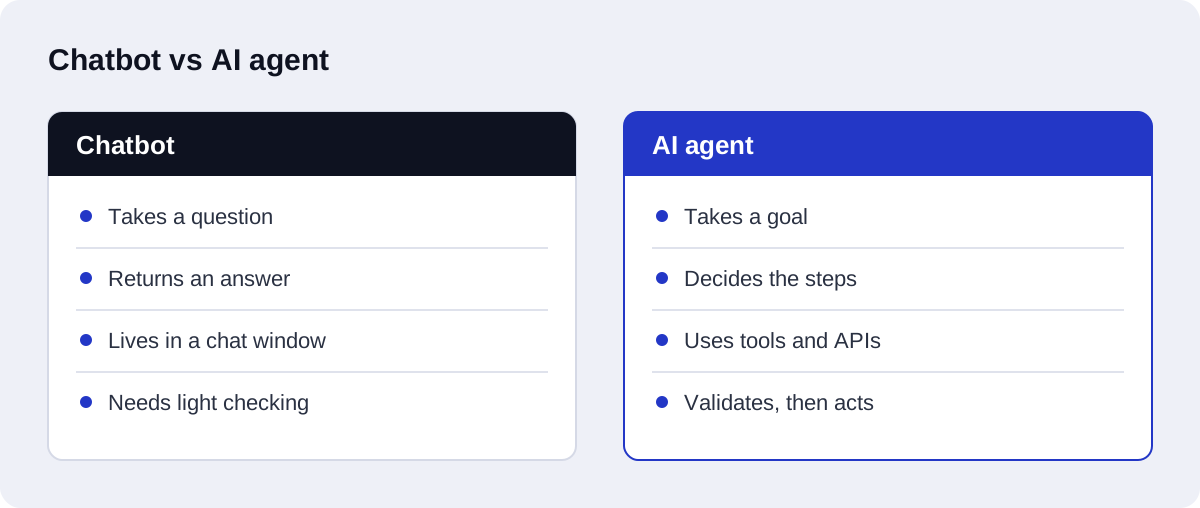
A chatbot answers questions. An AI agent completes a task. A chatbot takes a message and returns a reply; an AI agent takes a goal, decides which steps are needed, uses tools such as your CRM, email, or database to carry them out, and checks the result. If the work ends when the question is answered, you need a chatbot. If the work ends when a record is updated, a lead is routed, or a request is resolved, you need an agent.
That one distinction decides the cost, the build time, and the risk, so it is worth getting right before you pay for either.
AI agent vs chatbot at a glance
| Chatbot | AI agent | |
|---|---|---|
| Main job | Answer questions | Complete a task |
| Output | A reply in a chat window | An action in one or more systems |
| Uses tools and APIs | Rarely | Yes, that is the point |
| Decides its own steps | No, it follows the conversation | Yes, within limits you set |
| Needs validation and fallback logic | Light | Essential |
| Typical build | Days | Days to weeks, depending on integrations |
| Main risk | A wrong or generic answer | A wrong action in a real system |
What a chatbot does well
A chatbot is the right tool when the value is in the answer itself. Good examples:
- answering opening hours, pricing, policies, and product questions
- collecting a visitor's name, email, and what they need
- pointing people to the right page or the right person
A modern chatbot can be very good at this when it is connected to your own content through retrieval-augmented generation (RAG), so it answers from your documentation instead of general knowledge. We cover that in what a RAG chatbot is and when to build one.
What a chatbot does not do is finish the job. It can tell a lead "someone will contact you". It does not check whether the lead is qualified, create the CRM record, and assign it to a salesperson.
What an AI agent does differently
An AI agent has three things a chatbot lacks.
Tools. The agent can call APIs: read a form submission, look up a record, write to a CRM, send an email, post to a team channel.
A decision loop. The agent works out which step comes next based on what it has found so far, instead of following one fixed script.
Checks. Because the agent acts on real systems, its output has to be validated before it is used, and failed steps need a fallback.
Take lead qualification. A lead arrives through a form. The agent reads it, works out which details are missing, checks the company and budget against your rules, validates the email and phone format, writes a clean record to the CRM, and notifies the right person. If a detail fails validation or the lead does not fit any rule, the agent stops and hands the case to a human with its notes attached.
That last part matters more than the clever part. In our own builds, the steps clients value most are usually the validation and fallback steps, because those are what make the system safe to leave running.
What "tools" and "function calling" mean in plain words
These two terms appear in almost every description of an AI agent, and they are simpler than they sound.
A language model can only produce text. It cannot open your CRM or send an email by itself. A tool is a small piece of ordinary software that can do one of those things: "look up a contact by email", "create a booking", "send a message to the sales channel". The developer writes the tool and describes it to the model in a short note: what the tool is called, what it does, and what information it needs.
Function calling is how the model asks for a tool to be used. Instead of writing a reply to the customer, the model writes a structured request, something like "run the contact lookup with this email address". The surrounding software reads that request, runs the tool, and gives the result back to the model. The model then decides what to do next: call another tool, ask the customer a question, or write the final reply.
Three points follow from this:
- The model never touches your systems directly. It only asks. Your code decides whether the request is allowed and carries it out.
- An agent can only do what its tools allow. If there is no "issue refund" tool, the agent cannot issue a refund, whatever a customer types.
- Every tool call can be checked and logged. This is where validation lives, and it is why a well-built agent can be audited afterwards.
So when someone offers you an "agent", the useful question is: which tools does it have, and what is each one allowed to do?
The same enquiry, handled by a chatbot and then by an agent
Suppose a clinic receives this message in the evening: "I need to move my appointment on Thursday to next week, mornings only."
Handled by a chatbot
- The chatbot reads the message and recognises a rescheduling request.
- It searches the clinic's published content and finds the rescheduling policy.
- It replies with the policy and the way to reschedule: a phone number, a booking link, or a promise that staff will call back.
- If it is set up to capture contacts, it records the patient's name and number for the front desk.
The patient has an accurate answer. The appointment has not moved. A staff member still has to do the work the next morning.
Handled by an agent
- The agent reads the message and identifies the goal: move an existing appointment to a morning slot next week.
- It calls a lookup tool to find the patient's Thursday appointment. If it finds none, or more than one, it asks the patient to confirm instead of guessing.
- It calls an availability tool for morning slots next week.
- It checks the clinic's rules: is the change inside the allowed notice period, and can this appointment type be moved without a staff decision?
- It offers the patient two or three slots and waits for a choice.
- It calls the booking tool to move the appointment, then reads the booking back to confirm the change was saved.
- It sends a confirmation and logs what it did.
- If any step fails, or the rules say a person must decide, it stops and hands the case to the front desk with a summary.
The conversation looks similar from the patient's side. The difference is that in the second version the task is finished, and that eight things had to be built and tested instead of three.
Risk and guardrails
A chatbot's worst outcome is a wrong answer. An agent's worst outcome is a wrong action: a record overwritten, a message sent to the wrong person, a booking cancelled. Guardrails are the design choices that keep that from happening.
| Guardrail | What it does |
|---|---|
| Narrow tools | Each tool does one specific thing, with only the permissions it needs |
| Read before write | The agent looks up the current state before it changes anything |
| Output validation | Values are checked against rules and formats before they are saved |
| Approval steps | Actions that are costly or hard to undo wait for a person to approve |
| Human handoff | Unclear, unusual, or failed cases go to staff with the agent's notes |
| Logging | Every tool call and decision is recorded so mistakes can be traced |
| Limits | A cap on steps per request, so a confused agent stops instead of looping |
A practical rule: let the agent act alone on things that are easy to reverse, and require approval for things that are not. Updating a lead's status is easy to reverse. Sending a quote to a customer is not.
Guardrails also keep running costs predictable. Language model providers bill by tokens processed, as shown on the OpenAI API pricing page, and an agent that loops through the same steps keeps spending until something stops it.
Which one do you need?
Ask what "done" looks like for the task.
Choose a chatbot when:
- the task is finished once the person has an accurate answer
- the questions repeat and the answers already exist in your content
- nothing needs to be written to another system, or a simple contact capture is enough
Choose an AI agent when:
- the task has several steps and touches two or more systems
- a person currently reads, decides, and then enters data somewhere
- the rules for that decision can be explained to a new employee
Choose both when the conversation is the front door and the agent is the back office. A support chatbot answers from your knowledge base, and when a customer asks for something that needs an action, such as a change to a booking, it passes the request to an agent that carries it out or escalates it.
A quick way to place common small business tasks:
| Task | Better fit | Why |
|---|---|---|
| Answering product and policy questions | Chatbot | The answer is the whole job |
| Capturing a lead's contact details | Chatbot | One simple write, no decision |
| Qualifying a lead and routing it in the CRM | Agent | Several steps, rules, and a system update |
| Rescheduling a booking | Agent | Needs lookups, rules, and a change to a record |
| Support that sometimes needs an account change | Both | Chatbot answers, agent handles the action |
There is more on the first two rows in our guide to AI chatbots for lead generation and customer support. The third row is the most common first agent we see, and it is the core of our AI-driven CRM automation work.
What an AI agent costs compared with a chatbot
A chatbot is cheaper because there is less to integrate and less that can go wrong. An agent costs more for three reasons: every tool it uses is an integration to build and test, its decision logic has to be tested against real cases, and it needs validation, fallback, and logging. We break the numbers down in how much it costs to build an AI agent.
Agents built in n8n vs custom Python
AI agents for small businesses are usually built in one of two ways.
In n8n. n8n is a workflow automation platform with AI agent, tool, memory, and vector store nodes, described in the n8n documentation. The agent is assembled visually: a trigger, an agent node, and the tools it may call. This suits agents whose tools are mostly existing business apps, and teams who want to see and adjust the workflow themselves. It is the approach behind most of our n8n automation services.
In custom Python. The agent is written as a small service. This takes longer to set up, but it suits heavy logic, high volume, and anything that needs automated tests or a custom retrieval pipeline.
Neither is "more of an agent" than the other. The choice is about who will maintain it and how complex the logic is. Many builds use both: n8n to connect the apps, and a Python service for the parts that need real code. For the platform side of that decision, see n8n vs Zapier for AI automation.
How to start small
You do not have to choose the largest version on day one. A sensible order:
- Write the task down. List what comes in, what a person does with it, and where the result goes. Our guide to mapping your operations for AI workflow automation shows one way to do this.
- Start with answers. Launch a chatbot grounded in your content. It is useful immediately, and its conversation logs show what people ask for.
- Find the first action. Look for the request that comes up most often and ends in a simple, reversible action.
- Give the agent one tool with approval. Let it prepare the action and have a person approve it. Watch where it gets things wrong.
- Remove the approval where it has earned it. Keep approval on anything costly or hard to undo.
- Add the next tool. Repeat, one tool at a time.
Each step is useful by itself, and each one tells you whether the next is worth paying for.
Mistakes to avoid
Buying an agent when you need a chatbot. If nobody can describe the steps the agent should take, there is no agent to build yet.
Calling a chatbot an agent. A chat widget with a new label still only answers. Ask what actions it takes and in which systems.
Skipping the human handoff. An agent that cannot escalate will eventually act on a case it should not have touched.
Automating a broken process. If the manual process is unclear, the agent will be unclear faster. Fix the process on paper first.
How Axenor AI approaches the choice
We start from the task, not the technology. In a free automation audit we ask what comes in, what a person does with it, and where it ends up. If the answer is "the person replies", we recommend a chatbot grounded in your content. If the answer is "the person checks it, decides, and updates two systems", we scope an agent with validation steps and a human handoff. You can read how we build both on our AI agent development and AI chatbots and customer support pages, or describe your task to us and we will tell you which one fits.