The cost of building an AI agent depends on four things: how many systems it has to connect to, how complex its decisions are, how much testing it needs before it can be trusted, and what it costs to run each month. A single-purpose automation with one or two integrations can cost a few hundred dollars to build. A multi-step agent that reads data, makes decisions, writes to a CRM, and escalates edge cases costs more, because each of those parts has to be built and tested.
This guide explains what you are paying for, so you can read a quote and tell whether it is reasonable.
The two costs: build and run
Every AI agent has a one-time build cost and an ongoing running cost. Quotes that mention only the first are incomplete.
| Cost | What it covers | When you pay |
|---|---|---|
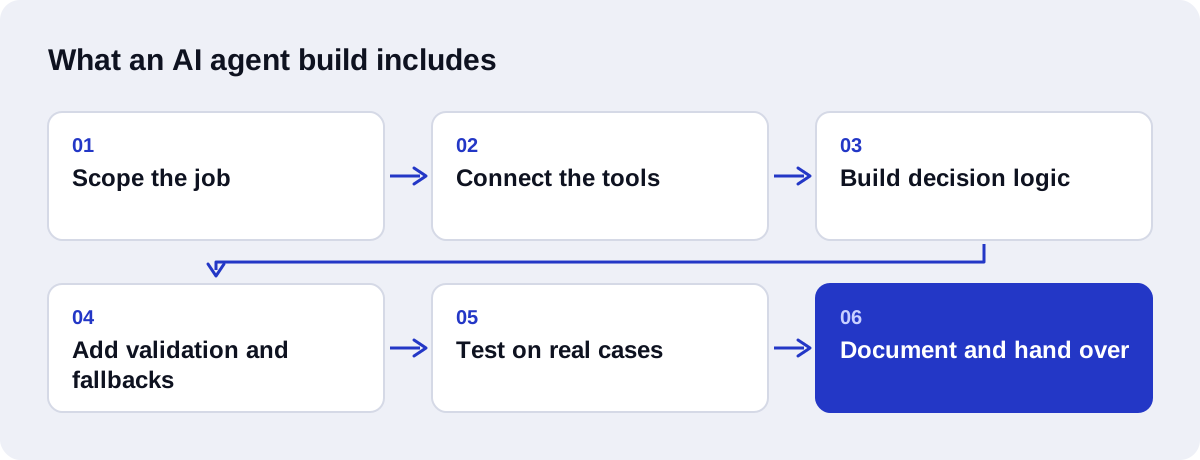
| Build | Scoping, integrations, prompts and logic, validation, testing, documentation | Once |
| Model usage | Fees from the language-model provider, charged per token processed | Monthly, scales with volume |
| Infrastructure | Hosting, a vector database if the agent uses your documents, an automation platform such as n8n | Monthly |
| Maintenance | Fixes when an API changes, prompt tuning, new rules | Monthly or as needed |
What drives the build cost
1. Number of integrations
Each tool the agent touches is an integration: a CRM, an email account, a form, a database, a webhook. Each one needs authentication, error handling, and testing. An agent that reads from one form and writes to one CRM is a small project. An agent that pulls from five sources is not five times one project, because the combinations also have to be tested.
2. Decision complexity
"If the budget is above X, route to sales" is cheap. "Read this free-text enquiry, work out what the customer wants, and decide which of six teams should handle it" needs careful prompt design and many test cases. The more judgement the agent exercises, the more testing it needs.
3. Validation and fallback logic
This is the part that separates a demo from a system you can leave running. Validation checks the agent's output against rules before it is written anywhere. Fallback logic decides what happens when a step fails: retry, try another route, or hand the case to a person. It adds build time and it is not optional for an agent that acts on real data.
4. Whether it needs your documents
If the agent has to answer from your own knowledge base, it needs a retrieval pipeline: document ingestion, chunking, embeddings, and a vector database. That is a project in its own right. See RAG vs fine-tuning for how that choice affects cost.
5. Testing on real cases
An agent should be run against real examples from your business before launch. Collecting those examples, running them, and fixing what fails takes a real share of the build time. It is also the first thing cheap quotes leave out.
Three example scopes
The drivers above are easier to judge with examples. These three are described by what is in them. Only the first two map to a listed price; the third is always quoted individually.
A small scope: one job, one or two systems
A form submission arrives. A language model reads the free-text message, labels it as sales, support, or other, and the workflow adds a row to a sheet and sends a notification to the right person.
What is in it: one trigger, one model step, one or two integrations, a check that the label is one of the allowed values, and a default route when it is not. There is no decision loop. The steps are the same every time.
This is closer to an automation with an AI step than to a full agent, and it is the kind of work our Starter package covers. If your need is mostly answering questions, a chatbot may fit better; see what to expect from the cost of AI chatbots.
A medium scope: a few connected systems and some rules
A lead arrives by form or email. The workflow cleans the data, asks the model to extract the company, need, and budget, checks those against your qualification rules, looks up the contact in the CRM, creates or updates the record, and notifies the assigned salesperson. Leads that fail validation go to a person.
What is in it: two or three integrations, a structured extraction step, rule checks, a branch for existing contacts, a fallback route, and a test run on a set of your past leads. This is the shape of our Growth package and of most AI-driven CRM automation work.
A larger scope: an agent that decides and acts
A support agent reads an incoming request, retrieves the relevant policy from your documents, looks up the customer's account, decides whether the request can be handled automatically, carries out the action or drafts a reply for approval, and logs everything. It escalates anything outside its rules.
What is in it: several tools, a retrieval pipeline over your documents, a decision loop, approval steps for sensitive actions, logging, a larger test set, and documentation. Each of those is real work, and the amount varies widely with your systems and rules. This is why a custom agent or RAG assistant is scoped after a consultation and given a fixed price before work starts.
| Small | Medium | Larger | |
|---|---|---|---|
| Systems connected | One or two | Two or three | Several |
| Decisions | A label or a simple rule | Rules applied to extracted data | A loop: the agent chooses its next step |
| Uses your documents | No | Rarely | Often |
| Validation and fallback | A format check and a default route | Rule checks and a human route | Checks at every action, approvals, logging |
| Testing | A handful of examples | A set of past cases | A larger set, re-run after each change |
The difference between a chatbot and each of these is covered in AI agent vs chatbot.
What Axenor AI charges
These are our own prices, published so you have a concrete reference point.
| Project | Price |
|---|---|
| One focused automation (Starter) | $299 |
| Two to three connected systems (Growth) | $699 |
| Workflow automation setup | $500 to $2,000 |
| Chatbot setup | $300 to $800 |
| Custom AI agent or RAG assistant | Scoped after a consultation, fixed price before work starts |
| Ongoing maintenance (Retainer) | $350 per month |
Custom agents are scoped individually because the five drivers above vary so much between projects. You receive a written scope and a fixed price before any work begins.
Build vs buy: a platform subscription or a custom build
Before paying for a build, check whether a product you can subscribe to already does the job. There are two ways to "buy".
A ready-made AI product. Many help desk, CRM, and booking tools now include an assistant. If your task is the one the product was designed for, this is the fastest route. The tradeoff is fit: you get the vendor's workflow, the vendor's limits, and a fee for as long as you use it.
An automation platform you configure. Tools such as n8n and Zapier let you assemble workflows yourself. You pay a platform fee and your own time. The pricing models differ: n8n's cloud plans are based on workflow executions, and Zapier's plans are based on tasks. We compare them in n8n vs Zapier for AI automation.
A custom build is designed around your process and the tools you already use, and you own the result.
| Subscription product | Custom build | |
|---|---|---|
| Upfront cost | Low | Higher |
| Ongoing cost | A fee that continues, often tied to seats or usage | Running costs and maintenance |
| Fit to your process | You adapt to the product | Built around your process |
| Control over logic and data | Limited to the settings offered | Full |
| Time to start | Fast | Slower |
| Who maintains it | The vendor | You or your builder |
Buying makes sense when the task is common and the product matches how you work. Building makes sense when the task crosses several of your systems, depends on your own rules, or when the subscription fee grows with volume faster than the value does. Many setups mix the two: a platform for orchestration and custom work for the parts no product covers.
What the running costs look like
Model usage is charged by the provider per token, which roughly means per word read and written. A lead qualification agent that handles a few hundred short enquiries a month uses very little. An agent that reads long documents on every request uses far more. Ask for an estimate based on your real volume. Providers publish their current rates, for example on the OpenAI API pricing page, and those rates differ by model, so the choice of model is part of the cost.
Infrastructure is usually small for a single agent: a low-cost server or an automation platform plan, plus a vector database if retrieval is involved.
Maintenance is the cost people forget. APIs change, your rules change, and the model provider releases new versions. Budget for a few hours a month or a retainer.
Hidden costs to ask about
These rarely appear on a quote, and each one is real.
- Your team's time. Someone has to explain the process, supply examples, arrange access to systems, and review test results. A build stalls without this.
- Content and data clean-up. If the agent uses your documents or CRM data, duplicates and outdated records have to be fixed first. This is often the client's work, not the builder's.
- API access. Some tools only offer API access on certain plans. Check before the build starts.
- Third-party accounts. Model provider, vector database, hosting, and automation platform accounts are usually in your name and billed to you directly.
- Retries and long prompts. Every retry and every long document passed to the model is billed again. Good design keeps prompts short and retries limited.
- Monitoring. Someone has to look at the failures the agent escalates. If nobody owns that queue, the fallback is not a fallback.
- Change requests. New rules after launch are normal. Agree how they are priced.
- Handover. If the builder leaves, can someone else maintain it? Documentation is what makes that possible.
How to phase a project to control cost
You do not have to commit to the largest scope at once. Phasing spreads the cost and tests each assumption before the next payment.
- Map the task. Write down what comes in, what a person does, and where the result goes. See mapping your operations for AI workflow automation. If you want help choosing where to start, that is what AI automation consulting is for.
- Build the smallest useful version. One input, one decision, one output, with a person approving the result. This is often a small scope.
- Run it on real cases. Record what it gets wrong. This tells you what the next phase should fix, and whether the idea is worth continuing.
- Add integrations one at a time. Each new system is a separate, priced step with its own tests.
- Remove approvals gradually. Let the agent act alone only where it has been reliable.
- Move to maintenance. Once it is stable, a retainer covers fixes and small changes.
A phased project can stop after any step and still leave you with something that works. That is the main protection against an overrun.
How to keep the cost down
- Start with one job. An agent that does one thing well is cheaper and more reliable than one that does five things badly.
- Fix the process first. If the manual steps are unclear, write them down before paying anyone to automate them.
- Use the tools you already have. Connecting to your existing CRM is cheaper than moving to a new one.
- Decide what goes to a human. Trying to automate every edge case is where budgets run away. Escalating the rare cases is cheaper and safer.
Questions to ask before you accept a quote
- Which systems will the agent connect to, and who handles the API access?
- How will the agent's output be validated before it is used?
- What happens when a step fails?
- Will it be tested on our real cases before launch?
- What will it cost to run each month at our volume?
- Will we receive documentation so someone else can maintain it?
If a quote cannot answer these, the low price is covering for missing work.
Is an AI agent worth the cost?
Compare the build and running cost with the staff time the task takes now. If a person spends an hour a day reading, checking, and re-entering data, that is more than twenty hours a month. An agent that removes most of that work pays for itself quickly, as long as it is reliable enough to trust. That is why the validation and testing lines in the quote are the ones not to cut.
If you want a number for your own case, book a free automation audit and describe the task. We reply with a recommended build, a scope, and a price. You can also read how we build agents on our AI agent development page, and how we handle simpler multi-step work on our AI workflow automation page.