AI workflow automation means connecting your tools so that a routine process runs by itself, with an AI model handling the steps that need reading or writing. Ordinary automation moves data between apps by fixed rules. Adding an AI step lets the same workflow sort a message, pull details out of free text, or draft a reply. For a small or medium business, the practical goal is to take one repetitive process off someone's desk and make it run reliably.
Where AI workflow automation creates the fastest wins
The strongest first builds usually improve one connected path: lead capture, qualification, routing, follow-up, and reporting.
What is AI workflow automation?
A workflow is a sequence of steps that starts with an event and ends with an outcome. A form is submitted, and a lead ends up in the CRM with a reply sent.
Workflow automation has a piece of software carry out those steps instead of a person. AI workflow automation adds one or more steps where a language model reads or produces text. If you want a longer definition with examples, see what AI workflow automation is.
The important point is that the AI is a step inside the workflow. The workflow still has a defined start, a defined order and a defined end. That structure is what makes it predictable enough to trust with real work.
How is an AI workflow different from rule-based automation?
Rule-based automation works on structured data. "If the form field 'country' equals 'UK', assign to Sam." It is fast, cheap and exact, and it cannot cope with anything it was not given a rule for.
Much business input is unstructured: emails, chat messages, PDFs, notes. A rule cannot tell whether an email is a complaint or a sales enquiry. A language model can, most of the time. An AI workflow uses rules wherever rules work and a model only where the input is free text or the output is written language.
| Rule-based automation | AI workflow automation | |
|---|---|---|
| Input it handles | Structured fields | Structured fields plus free text, documents, messages |
| How decisions are made | Fixed conditions you write | Fixed conditions, plus model judgement at specific steps |
| Behaviour | Same input always gives the same output | AI steps can vary, so outputs need checking |
| When it fails | Stops on anything unexpected | Can return a wrong or badly formatted answer if unchecked |
| Running cost | Platform usage | Platform usage plus model usage |
| Best for | Moving and transforming known data | Sorting, extracting, summarizing and drafting |
A good build uses as little AI as the process needs, because every AI step adds cost and something to validate.
A related question is where an AI agent fits. A workflow follows a path you designed. An agent is given a goal and tools and chooses its own steps. Agents suit open-ended tasks; workflows suit repeatable ones. We cover the difference in AI agent vs chatbot, and most small business needs are met by a workflow.
What do the AI steps actually do?
In practice, an AI step does one of five jobs.
Classify. Put an input into one of a fixed set of categories. Is this email a sales enquiry, a support request, an invoice or spam? Which department should get this ticket?
Extract. Pull specific fields out of free text or a document. The order number from an email. The supplier name, date and total from an invoice.
Summarize. Shorten long content for a person who needs the gist. A call transcript turned into five lines of notes on the CRM record.
Decide. Choose a next action from a short list, using context a simple rule cannot capture. Should this lead get the standard reply, a call booking link, or a handoff to the owner? This is classification applied to actions, and it should stay within options you define.
Draft. Write text for a person to send or approve. A first reply to an enquiry, a follow-up message, a product description, a weekly report.
Each of these has a narrow input and a narrow output on purpose. A step that returns "one of these six categories" can be checked automatically. A step asked to "handle the email" cannot.
Where the AI needs to answer from your own documents, such as policies, price lists or manuals, the workflow adds a retrieval step that finds the relevant passages first. That pattern is called retrieval-augmented generation, and it is what keeps answers tied to your material instead of the model's general knowledge.
Which processes should a small business automate first?
Good first candidates share four traits: they happen often, they follow a similar path each time, the data is already in digital tools, and a mistake is easy to spot and undo. That is where small business automation is easiest to justify.
| Process | Fit as a first project | Why |
|---|---|---|
| Lead capture to CRM and first reply | Good | Frequent, clear trigger, clear outcome, easy to check |
| Routing and tagging inbound email or support tickets | Good | A classification task with a fixed list of destinations |
| Answering common customer questions on a website or WhatsApp | Good | Repetitive questions, answers already exist in your documents |
| Appointment reminders and follow-ups | Good | Mostly rule-based, with light drafting |
| Pulling invoice or order details into a spreadsheet or accounting tool | Good, with review | Extraction works well, but totals should be checked by a person or a rule |
| Meeting or call notes into the CRM | Good | Summarizing is low risk and saves typing |
| Weekly reports assembled from several tools | Good | Scheduled, structured, repetitive |
| Quoting for custom or complex jobs | Poor first choice | Depends on judgement and experience; automate the data gathering only |
| Complaints, refunds and disputes | Keep a person in charge | High cost if handled badly; AI can sort and summarize, a person should respond |
| Hiring decisions, legal or medical advice | Do not automate the decision | High stakes and often regulated |
| A process that runs a few times a year | Not worth it | Build and upkeep outweigh the benefit |
| A process nobody can describe consistently | Not yet | Fix and document the process first |
Customer messaging is a common starting point. A WhatsApp AI chatbot that answers routine questions and passes the rest to staff is a typical example of workflow automation for small business.
Whatever you choose, map it before you build. Our guide to mapping your operations for automation walks through a worked example.
What are the building blocks of an AI workflow?
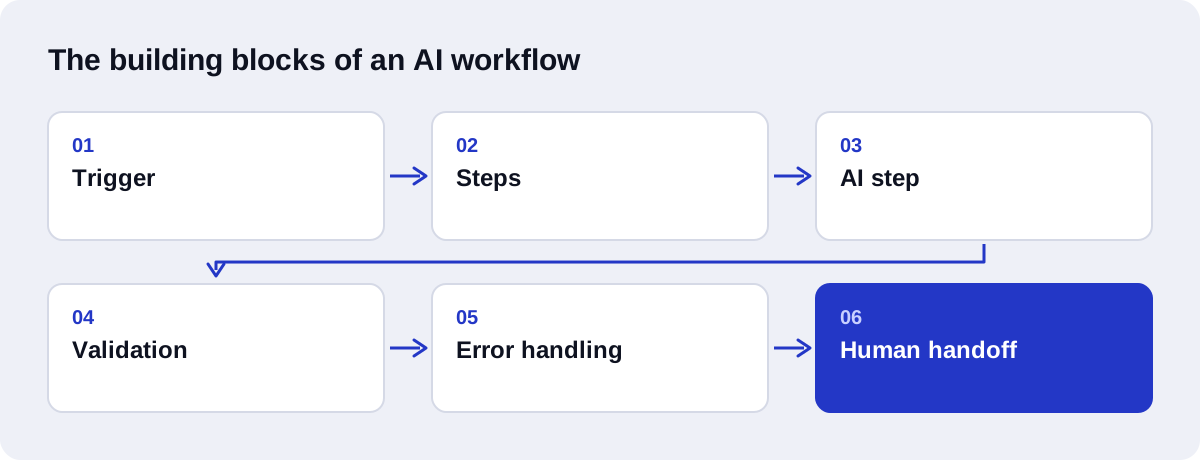
Every AI workflow, whatever the tool, is made of the same six parts.
Trigger. The event that starts a run: a form submission, a new email, a new row in a sheet, a webhook from another system, or a schedule.
Steps. The ordinary actions: look up a record, create or update something, send a message, branch on a condition.
AI step. A call to a language model with a prompt, the relevant input, and a required output format. It does one of the five jobs above.
Validation. A check on the AI step's output before anything acts on it. Is the category one of the allowed values? Is the extracted date a real date? Does the total match the line items? Is a required field empty?
Error handling. What happens when something fails: a tool is unavailable, a rate limit is hit, a record is missing. Typically a retry, then a logged failure and an alert to a named person, with the original input kept so nothing is lost.
Human handoff. A defined point where a person takes over or approves. This covers low-confidence cases, anything outside the rules, and actions you have decided always need a human, such as sending a quote.
The first three get the attention. The last three decide whether the workflow can be left running.
Which tools are used to build AI workflows?
Three options cover most small and medium businesses. This is a high-level view; we compare the first two in detail in n8n vs Zapier for AI automation.
| n8n | Zapier | Custom Python | |
|---|---|---|---|
| What it is | Visual workflow builder with code steps available | Hosted visual automation platform with a large app catalogue | Code written for your process, often served with a framework such as FastAPI |
| Hosting | Self-hosted or n8n's cloud service | Hosted by Zapier | Your own server or cloud account |
| How usage is counted | On n8n Cloud, by workflow executions | By tasks | Your hosting, plus model usage |
| Suits | Multi-step workflows, branching, teams that want control over data and hosting | Simple connections between popular apps, set up quickly by non-developers | Heavy logic, unusual integrations, document processing, anything a visual tool makes awkward |
| Trade-off | Self-hosting needs someone to maintain it | Usage grows with the number of action steps | Needs a developer to build and change |
A few verified facts are worth knowing when you choose.
n8n is source-available under a fair-code licence called the Sustainable Use License, published in its source repository. You can self-host it or use it as a cloud service.
The two platforms count usage differently. n8n Cloud pricing is based on workflow executions: one run of a whole workflow counts once, regardless of the number of steps. Zapier pricing is based on tasks: each successfully completed action step uses a task, while filters and formatters do not. Check both pricing pages against your own volume.
The AI model is billed separately from the workflow tool. With the OpenAI API, usage is charged per token, so cost depends on how much text each run sends and receives.
A common pattern is n8n for the triggers and connections, with a small Python service for the parts that need real code. Our n8n automation services page describes how we work with it.
How do you implement AI workflow automation step by step?
- Pick one process. Choose from the "good" rows above. One trigger, one outcome.
- Map it as it runs today. List every step, who does it, in which tool, and every exception.
- Decide what stays manual. Mark the steps that need a person and where approvals sit.
- Define each AI step's contract. State the input, the required output format and the allowed values. Collect real past examples with the right answer for each.
- Choose the tool. Base it on your existing apps, your volume, where your data must live, and who will maintain it.
- Build the smallest working version. Trigger, core steps, one AI step, validation, a failure alert.
- Test with real examples. Run the collected cases, including the awkward ones. Fix prompts and rules until they pass.
- Run it alongside the manual process. For a short period, let the workflow produce results that a person reviews before they go out.
- Go live with monitoring. Remove the review where results have earned it. Keep it where the cost of a mistake is high.
- Review and extend. Look at the failures and handoffs after a few weeks. Tighten the workflow, then pick the next process.
Why do validation and fallback matter?
A rule gives the same output every time. A language model does not. It can return a category that is not on your list, invent a value for a field that was missing, format a date differently, or sound confident about something it got wrong. In a chat window a person notices. In a workflow, nobody is watching, and the wrong value goes straight into your CRM or out to a customer.
Validation is how the workflow notices instead. Typical checks:
- The output matches the required structure and every required field is present.
- Categories are from the allowed list.
- Extracted values pass format and sanity checks: valid email, real date, total equals the sum of lines.
- Extracted values appear in the source text, which catches invented details.
- Drafts stay within length limits and do not include prices or promises you have not approved.
Fallback is what happens when a check fails. In order of preference: retry once, use a safe default such as "unclassified", then send the item to a person with the original input and the reason. The item must never disappear silently, and the workflow must never guess on something that matters.
This is the difference between a demo and a system, and it is a large part of the build effort.
What should you measure?
Record a baseline before launch, using your own numbers, so you have something to compare against.
| Metric | What it tells you |
|---|---|
| Run volume | How many times the workflow ran in a period |
| Success rate | Share of runs that finished without an error |
| Handoff rate | Share of runs passed to a person, and why |
| Validation failure rate | How often an AI step's output was rejected |
| Correction rate | How often a person changed an AI output after review |
| Time from trigger to outcome | How long a lead, ticket or document waits end to end |
| Manual time per item | Staff minutes still spent on each item |
| Cost per run | Platform and model usage divided by runs |
| Downstream outcome | The business result the process feeds, such as replies received or bookings made |
Handoff rate and correction rate are the two to watch in the first month. A high handoff rate with accurate handoffs is fine at the start. A rising correction rate means a prompt, a rule or the input data needs attention.
What mistakes should you avoid?
Starting from a tool. Choosing a platform and then looking for something to automate leads to workflows nobody needed. Start from the process that costs you time.
Automating a broken process. If the manual version is inconsistent, the automated version will be consistently wrong. Fix it on paper first.
Using AI where a rule would do. If a dropdown field already tells you the service type, do not ask a model to work it out from the message.
No validation. An AI step whose output goes straight into another system is a fault waiting to happen.
No owner. Every workflow needs a named person who receives the alerts and can act on them.
Leaving it unmaintained. Apps change their APIs, your process changes, and models are updated. Plan for a periodic check.
Giving a customer-facing step no human route. People must be able to reach a person when the automation cannot help.
How much does AI workflow automation cost?
There are two kinds of cost: building it, and running it.
Running costs are paid to the platforms you use: the workflow tool, the model provider, and hosting if you self-host. They depend on your volume, so check the pricing pages linked above.
Build costs depend on who builds it. These are Axenor AI's own prices.
| Axenor AI option | Price | What it suits |
|---|---|---|
| Starter automation | $299 | One focused workflow with a clear trigger and outcome |
| Growth package | $699 | A larger or multi-part build |
| Workflow automation setup | $500 to $2,000 | Custom workflow projects, priced by the number of steps, integrations and AI steps |
| Chatbot setup | $300 to $800 | A website or WhatsApp chatbot |
| Retainer | $350 per month | Ongoing changes, monitoring and new workflows |
| AI agents and RAG assistants | Fixed price after a consultation | Scoped individually because requirements vary widely |
What moves a project up or down a range is mostly the number of systems to connect, the number of AI steps and how much validation they need, the number of exceptions, and the state of your data. For agent projects specifically, see our AI agent development page.
How does Axenor AI build it?
Axenor AI is a founder-led studio. Every system is built by founder Haseeb Sagheer, a software engineer, so the person you speak to is the person who writes the workflow. Work is done remotely.
The stack is Python, FastAPI, the OpenAI API, LangChain, Pinecone and n8n. Which of those a project uses depends on the process.
The founder builds automation for his own work as well, including a script-to-video pipeline and a tool that assembles CapCut video projects automatically, and has shipped his own products. The same approach applies to client work: map first, small working version, validation on every AI step, a human handoff where it matters, and alerts to a named owner.
Focused builds usually take 3 to 10 days. The process is:
- A free audit call to pick the process and check it is a good fit.
- A map and a short spec, with a fixed price.
- Build and testing against your real examples.
- A supervised period where you review outputs.
- Handover with documentation, and a retainer if you want ongoing changes.
The full scope is on the AI workflow automation service page. If you have a process in mind, book a free automation audit. If it is not a good candidate for AI automation for small business use, we will say so on the call.