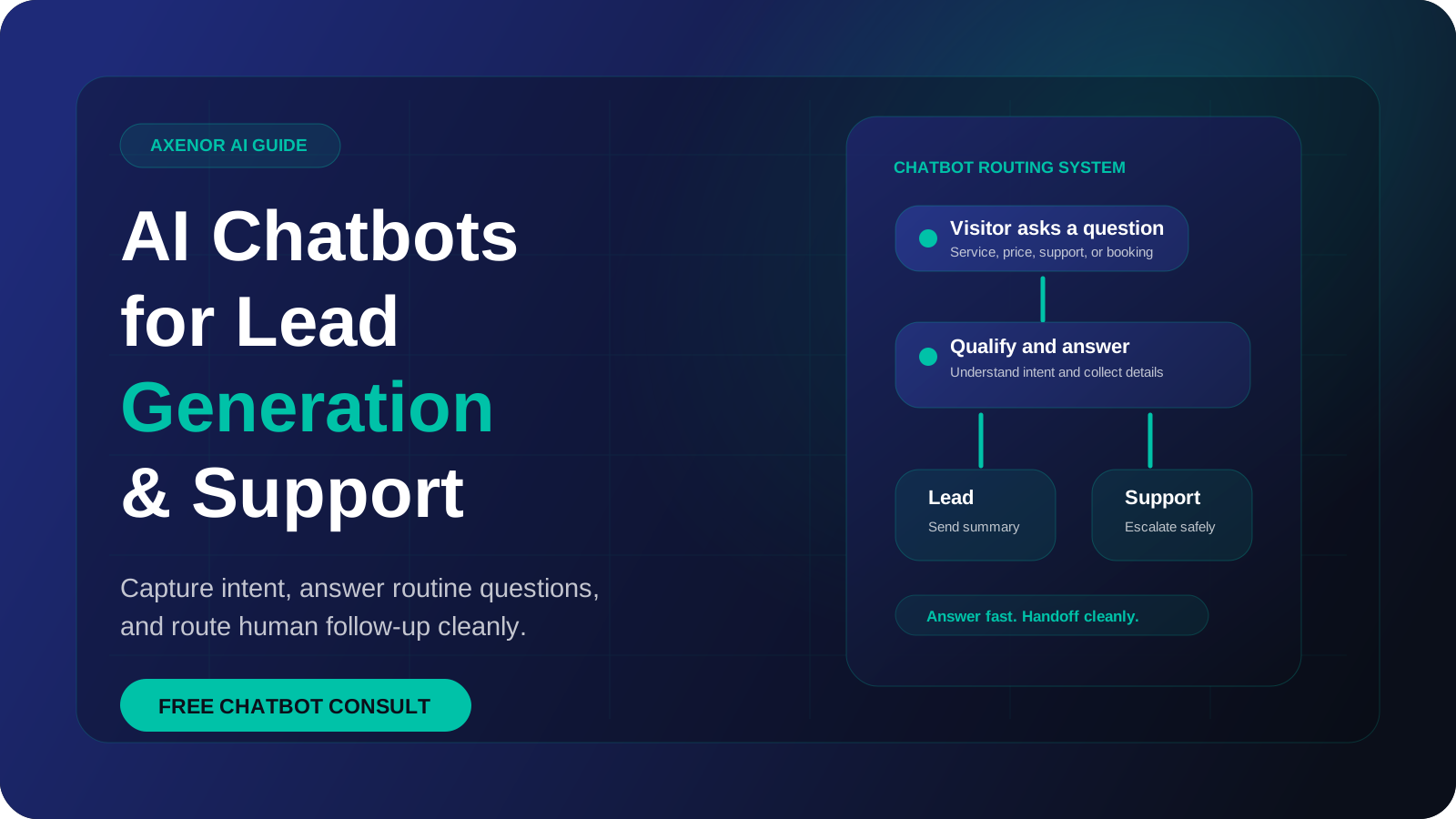
AI chatbots for business do two jobs well: they capture and qualify leads, and they answer routine customer questions from your own content at any hour. A good one knows when to stop and pass the conversation to a person. This guide explains how they work, what to prepare, how to roll one out, and what to measure once it is live.
What is an AI chatbot for business?
An AI chatbot for business is a program that holds a text conversation with your customers on your website or a messaging app, using a language model to understand what they wrote and to write a reply.
Older chatbots worked from decision trees. The customer clicked a button, the bot followed a branch, and anything outside the tree produced "Sorry, I did not understand that". A modern AI chatbot reads free text, so a customer can ask a question in their own words and still get a relevant answer.
The language model handles the wording. What makes the bot useful to your business is everything around the model:
- The content it is allowed to answer from
- The questions it asks to qualify a lead
- The tools it is connected to, such as your CRM or calendar
- The rules for when it hands over to a human
A chatbot without those four things is a general assistant with your logo on it. With them, it becomes part of how your business handles enquiries.
What two jobs do AI chatbots for business do?
AI chatbots for business are almost always doing one of two jobs, or both.
| Lead generation | Customer support | |
|---|---|---|
| Who is it talking to | Someone who has not bought yet | Someone who already has |
| Main goal | Capture contact details and qualify the enquiry | Resolve the question or route it correctly |
| What it needs to know | Services, pricing approach, service areas, availability | Policies, product details, order or account information |
| Where the conversation ends | A booked call, a saved lead, a notification to sales | An answer, a ticket, or a handoff to an agent |
| Typical connection | CRM, calendar, email | Help desk, order system, knowledge base |
It helps to decide which job comes first. The two need different content, different questions, and different success measures. Trying to launch both at once is a common reason projects stall.
How a lead generation chatbot works
A lead generation chatbot starts a conversation with a visitor, answers their first questions, and collects the details your sales process needs. A contact form asks for everything up front. A chatbot for lead generation asks one question at a time and gives something back between questions, which feels closer to talking to a person.
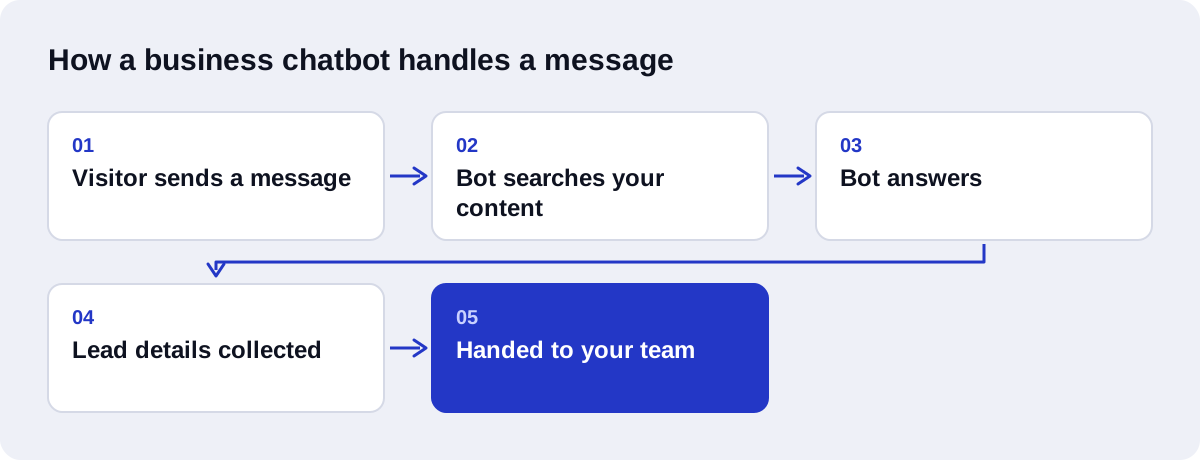
A typical flow looks like this:
- The visitor asks a question, for example about a service or a price.
- The bot answers from your content.
- The bot asks what the visitor is trying to get done.
- It asks two or three qualifying questions, such as budget range, timeline or location.
- It collects a name and a contact method.
- It saves the lead to your CRM and notifies the right person, or offers a booking link.
The qualifying questions matter most. They should be the same questions your sales team asks on a first call. If the bot collects those answers, the person following up starts the conversation further along. Connecting this to your pipeline is the subject of our AI-driven CRM automation service.
The details vary by industry. Property enquiries need location, budget and move date. Online shops care more about product questions and order status.
How a customer service chatbot works
A customer service chatbot answers the questions your team answers every day: delivery times, returns, opening hours, how to use a feature, where an order is. It does this from your documented policies, not from general knowledge.
Support bots have three possible outcomes for each conversation:
- Answer it. The question is covered by your content and the bot replies.
- Collect and route. The bot cannot solve it, so it gathers the order number, a description and contact details, then creates a ticket for the right team.
- Hand over now. The topic is sensitive or the customer is upset, so the bot passes the chat to a person immediately.
A support bot earns its place by handling the first outcome reliably and the other two gracefully. Our AI chatbots for customer support page describes how we set this up.
How does a chatbot answer from your own content?
A language model on its own knows nothing about your return policy. If you ask it, it may produce a confident, plausible and wrong answer. The fix is a method called retrieval-augmented generation, or RAG, first described in a 2020 research paper by Lewis and colleagues.
In plain terms, RAG works like an open-book exam:
- Your content is split into passages. FAQs, policy pages, product descriptions and manuals are cut into short sections.
- Each passage is indexed by meaning. A model converts each passage into a list of numbers called an embedding, which represents what the passage is about. OpenAI's embeddings guide explains the idea. The embeddings are stored in a vector database.
- The customer's question is matched. When a question arrives, the system finds the passages closest in meaning to it, even if the wording is different.
- The model answers from those passages. The language model receives the question together with the matching passages and is told to answer only from them.
Two things follow from this. The bot's answers are only as good as your content. And when your content changes, you update the documents, not the model. There is no retraining step.
For a fuller explanation, see what a RAG chatbot is.
What is the difference between a chatbot and an AI agent?
The terms are often used loosely, so here is a working distinction.
A chatbot answers. It takes a question, finds the right content, and replies. It may save a lead or create a ticket, but the conversation is the product.
An AI agent acts. It is given a goal and a set of tools, and it decides which steps to take. It might look up an order, check a refund rule, issue the refund, update the CRM and then email the customer, all from one request.
| Chatbot | AI agent | |
|---|---|---|
| Main output | An answer | A completed task |
| Uses tools | Few, in fixed steps | Several, chosen as needed |
| Risk if it gets something wrong | A wrong answer | A wrong action |
| Testing effort | Moderate | High |
| Good first project | Yes | Usually after a chatbot is working |
Most businesses should start with a chatbot. It is cheaper, faster to test, and it shows you which requests are common enough to automate further. Agents make sense once you know exactly which tasks you want done and you trust the data they act on. We compare the two in detail in AI agent vs chatbot.
Which channels should the chatbot run on?
Put the bot where your customers already contact you. For most businesses that means the website, WhatsApp, or both.
Website
A website widget is the simplest place to start. You control the design, and there are no channel fees. The limit is that the conversation ends when the visitor closes the tab, so capture a contact method early if follow-up matters.
WhatsApp suits businesses whose customers already message them there. The conversation stays in the customer's phone, so follow-up is natural.
There are rules to know before you plan it. Automation requires the WhatsApp Business Platform, also called the Cloud API. The free WhatsApp Business app does not support it. Since 1 July 2025 Meta charges per message for template messages in the marketing, utility and authentication categories, with rates that vary by country. When a customer messages your business, a 24-hour customer service window opens, and free-form replies inside that window are free.
So a bot that replies to incoming enquiries behaves very differently, in cost terms, from one that sends outbound campaigns. Our WhatsApp AI chatbot service covers the setup. If your customers write in Arabic, the bot needs content and testing in Arabic and a right-to-left chat layout.
What should the chatbot hand to a human?
Decide this before the build, not after the first complaint. A chatbot should pass the conversation to a person when:
- The customer asks for a human
- The question is not covered by your content
- The customer is angry or the conversation is going in circles
- The topic involves a complaint, a refund dispute or a legal matter
- The answer depends on a judgement call, such as a discount or an exception
- The enquiry involves health, safety or financial advice
- The lead is clearly high value and ready to talk
How the handoff happens matters as much as when. The person taking over should receive the transcript, the customer's details and a short summary, so the customer does not have to repeat anything. Outside working hours, the bot should say plainly when a person will reply.
Our comparison of AI chatbots and human customer service goes further into which conversations belong with each.
How do you prepare your content?
Content preparation is the least interesting part of a chatbot project and the part that most decides whether it works. A bot cannot give a clear answer from an unclear document.
Work through this before any build starts:
- Collect real questions. Export them from your inbox, chat history, support tickets and call notes. Do not guess.
- Group them. Sort the questions into topics and count how often each one comes up.
- Write one approved answer per question. Short, specific, in the tone you want the bot to use.
- Resolve contradictions. If the website says one thing and the PDF says another, the bot will repeat whichever it finds. Pick one.
- Remove outdated material. Old price lists and expired offers should not be in the knowledge base.
- List what the bot must not answer. Legal advice, medical advice, custom quotes, anything you want a person to handle.
- Name an owner. One person should be responsible for keeping the content current.
We go through this process step by step in how to train your AI chatbot on your FAQs.
How to implement an AI chatbot for small business step by step
An AI chatbot for small business does not need a long project plan. It needs a narrow first version and a habit of reviewing it.
Step 1: Pick one job and one channel. Lead capture on the website, or support on WhatsApp. Not both, not everywhere.
Step 2: Define what a good outcome is. For a lead bot, a saved lead with qualifying answers. For a support bot, a resolved question or a correctly routed ticket.
Step 3: Prepare the content. Follow the list in the previous section.
Step 4: Write the conversation rules. The greeting, the qualifying questions, the tone, the topics to refuse, and the handoff triggers.
Step 5: Build the retrieval layer. Index the content so the bot answers from it.
Step 6: Connect one system. Usually the CRM or the support inbox. A lead that stays inside the chat tool is a lost lead.
Step 7: Test with real questions. Use the questions you collected, including the badly worded ones. Test what happens when the bot does not know, and when a customer tries to push it off topic.
Step 8: Launch to a limited audience. One page of the site or a share of traffic, with someone reading the conversations daily.
Step 9: Review and fix. Each failed conversation points to missing content, an unclear rule, or a handoff that should have happened sooner.
Step 10: Expand. Add the second job, the second channel, or a further integration only when the first version is steady.
What should you measure?
Measure the bot against the job you gave it. These are the metrics worth tracking. Compare them against your own figures from before the bot, not against published averages, which rarely match your industry or traffic.
For lead generation
- Conversations started, as a share of visitors
- Leads captured, as a share of conversations
- Qualified leads, as a share of leads captured
- Booked calls or meetings from chatbot leads
- Leads that became customers
For customer support
- Containment rate: conversations resolved without a human
- Handoff rate, and the reasons for handoff
- Time to first response
- Customer satisfaction after the chat
- Unanswered questions: what the bot could not answer
For both
- Answer accuracy, checked by reading a sample of conversations each week
- Cost per conversation
The list of unanswered questions is the most useful of all. It tells you exactly which content to add next.
What mistakes should you avoid?
These are the ways AI chatbots for business most often go wrong.
Launching without content. Connecting a model to an empty knowledge base produces a bot that guesses.
No handoff. A bot with no way out traps customers and damages trust faster than having no bot at all.
Hiding that it is a bot. Say so in the first message. It is the honest thing to do, and it sets the right expectations.
Asking too many questions. A lead bot that asks for ten details before giving any value loses the visitor.
Leads that go nowhere. If nobody is notified and nothing reaches the CRM, the bot has only moved the problem.
Trying to automate everything. Start with the common, simple questions. Leave complaints and exceptions with people.
Never reading the conversations. The transcripts are the best feedback you will get. Read them.
Letting content go stale. A bot quoting last year's prices is worse than no answer.
Buying an agent when you need a chatbot. More autonomy means more testing and more risk. Earn it in stages.
What do AI chatbots for business cost?
Cost has two parts: a one-time setup to plan, build and test the bot, and a monthly running cost for model usage, hosting, channel fees and maintenance. Setup depends on the number of topics, the channels, the integrations and the languages. Running cost depends mostly on conversation volume.
At Axenor AI, chatbot setup usually costs $300 to $800. Custom AI agents and RAG assistants are scoped with a fixed price after a consultation. The full breakdown, including the pricing models vendors use and the questions to ask before accepting a quote, is in our guide to AI chatbot pricing and what to expect.
How Axenor AI builds chatbots
Axenor AI is a founder-led studio that works remotely. Every system is built by the founder, Haseeb Sagheer, a software engineer, so the person who scopes your project is the person who writes the code.
The process follows the steps in this guide:
- Audit. We look at your real enquiries, your current tools and where time is being lost.
- Scope. You get a written scope with a fixed price: one job, named channels, named integrations.
- Content. We structure your FAQs and documents for retrieval and flag gaps and contradictions.
- Build. Chatbots are built with Python, FastAPI, the OpenAI API, LangChain and Pinecone, with n8n for the workflows around them.
- Test. We run your real questions through the bot and show you the results before launch.
- Handover. You get the accounts, the documentation and a way to update the content.
Focused builds usually take 3 to 10 days. An optional retainer covers updates and monitoring afterwards.
If you want to see how we approach retrieval, Ask Haseeb AI is an open-source RAG assistant built by the founder, and you can read client reviews and our work for more.
Where to start
Pick the job that costs you the most time today, write down the questions behind it, and build the smallest bot that handles them well. That is a better first project than a bot that tries to do everything.
If you would like help choosing that first job, book a free automation audit.