The automation vs manual question is rarely all or nothing. Automate the steps that are frequent, rule-based and cheap to get wrong, and keep a person on the steps that need judgement, carry real risk or change often. Most processes end up as a mix of both.
This article gives you a way to decide step by step, a worked example, and a safe method for making the switch.
Workflow automation vs manual processes at a glance
Manual work is useful when judgment matters. Automation is stronger when the same operational steps repeat often and need reliable follow-through.
Factor
Ownership
Manual Process
People remember, check, copy, route, and follow up by hand.
Automated Workflow
A defined workflow moves predictable steps forward and alerts the right person.
Factor
Speed
Manual Process
Work waits until someone is available to notice and process it.
Automated Workflow
Inputs can be captured, sorted, routed, and prepared immediately.
Factor
Consistency
Manual Process
Results vary by person, workload, timing, and documentation habits.
Automated Workflow
The same request type follows the same rules, handoffs, and tracking path.
Factor
Visibility
Manual Process
Status often lives inside inboxes, spreadsheets, messages, or memory.
Automated Workflow
Owners can see what arrived, what happened, and what still needs attention.
What is the difference between automation and manual processes?
In a manual process, a person does each step: reads the email, copies the details, updates the spreadsheet, sends the reply. The person supplies both the labour and the judgement.
In an automated process, software does the steps according to rules you set in advance. An event starts the workflow, data moves between systems, and the result is produced without anyone touching it.
With AI in the mix, automation can also handle steps that used to need a person to read something, such as sorting an enquiry by topic or pulling fields from a document. Our guide to what AI workflow automation is covers that in more detail. The decision in this article stays the same either way: which steps should software do, and which should a person keep.
Manual vs automated processes: how do they compare?
| Factor | Manual process | Automated process |
|---|---|---|
| Speed | Depends on who is available and what else they are doing | Runs as soon as the trigger fires, at any hour |
| Consistency | Varies between people and between days | The same steps in the same order every time |
| Cost shape | Low to start, grows with volume because each item needs someone's time | Higher to set up, then a smaller running cost that grows slowly with volume |
| Flexibility | High. A person adapts to an odd case on the spot | Low unless the odd case was planned for |
| Error type | Occasional, random slips: a typo, a missed email | Rare, but systematic: one wrong rule repeats on every item until someone notices |
| Oversight | Built in, since a person sees every item | Must be designed in, with logs, alerts and review points |
Two rows deserve attention.
Error type. People make scattered mistakes. Automation makes the same mistake every time. A wrong rule in a workflow can send the wrong message to every customer in a batch before anyone looks. Automated processes are not more error-prone, but their errors need a different kind of watching.
Oversight. When a person does the work, checking happens as a side effect. When software does it, nobody sees the items unless you build a way to see them.
How do you decide whether to automate a process?
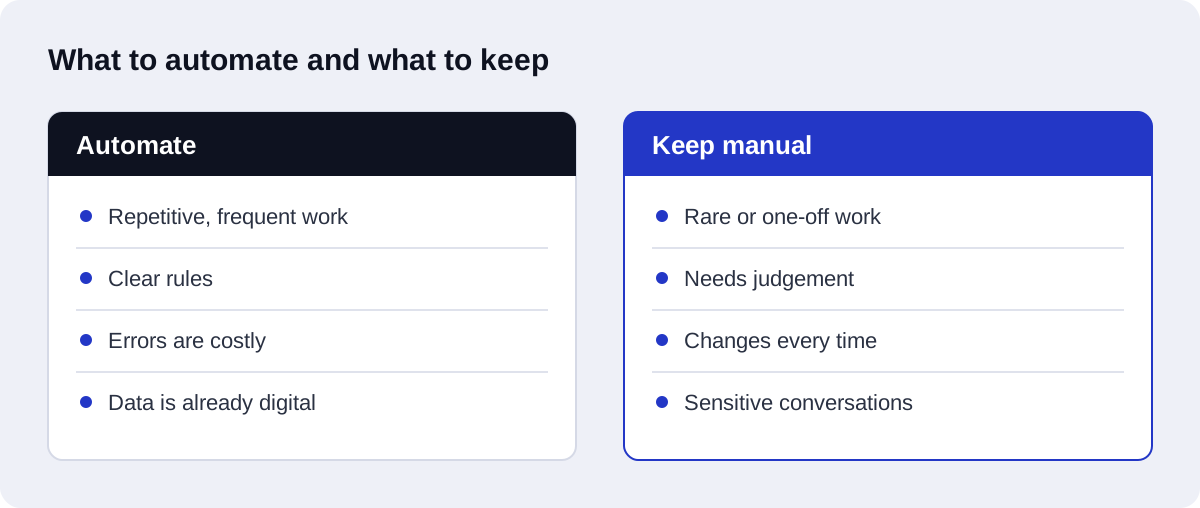
Score the process on five factors. Give each a 0, 1 or 2.
| Factor | Score 0 | Score 1 | Score 2 |
|---|---|---|---|
| Frequency | Happens rarely | Happens regularly | Happens many times a day |
| Rules or judgement | Each case needs a judgement call | Mostly rules, with some exceptions | Clear rules you could write down |
| Cost of an error | A mistake is serious or hard to undo | A mistake is awkward but fixable | A mistake is minor and easy to correct |
| Data availability | Information is on paper, in calls or in people's heads | Digital, but inconsistent or spread across places | Digital, structured and reachable by software |
| Stability of the process | Changes often or is still being worked out | Changes now and then | Has been done the same way for a long time |
Add the scores for a total out of 10.
- 8 to 10: a strong candidate. Automate it.
- 5 to 7: a candidate for the hybrid pattern described below. Automate the routine steps and keep a person on the rest.
- 0 to 4: keep it manual for now, or fix the weak factor first.
These bands are a rule of thumb for sorting your list, not a measured threshold. Use them to compare processes against each other.
Watch for one override. A score of 0 on cost of an error should stop full automation no matter what the total is. A frequent, rule-based process where a mistake is serious still needs a person to approve the result.
A low data score is often fixable. Replacing a paper form with a web form can turn a 0 into a 2. A low stability score is not fixable by automation. If the process keeps changing, automating it means rebuilding the workflow every time.
Which processes should stay manual?
Some work is better done by a person, and that is a sound decision, not a failure to modernise.
- Decisions with serious consequences. Approving a large refund, signing off a contract, or anything with legal or safety weight. Software can prepare the decision. A person should make it.
- Conversations that depend on the relationship. A complaint from a long-standing customer, a difficult negotiation, bad news. A template reply here does damage.
- Rare tasks. If something happens a few times a year, building and maintaining a workflow costs more effort than doing it by hand.
- Processes that are still changing. If you are still working out how to do it, do it manually until it settles.
- Work with no reliable data. If the inputs live in phone calls and memory, there is nothing for software to act on yet.
- Exceptions. By definition, the unusual cases are the ones the rules did not cover.
What is the hybrid pattern?
Most real processes are not fully manual or fully automated. The useful pattern is:
- Software does the routine steps: collecting, copying, sorting, drafting, reminding.
- Software flags anything that does not fit the rules.
- A person handles the flagged exceptions and gives approvals where the stakes are high.
This is how to automate manual processes without losing control. The person stops being the one who moves data around and becomes the one who decides. They see fewer items, and the items they see are the ones that need them.
An approval step is the simplest form. The workflow prepares everything, then waits for a person to click approve or reject before the final action happens. If you are weighing this for customer or sales work, our AI-driven CRM automation service is built around this pattern.
A worked example: handling a new enquiry
Take a common process in a small service business: a potential customer fills in the contact form on the website.
Before: fully manual
- The form sends an email to a shared inbox.
- Someone notices the email when they next check the inbox.
- They read it and decide what kind of enquiry it is.
- They copy the name, email, phone number and message into the CRM or a spreadsheet.
- They write a reply acknowledging the enquiry.
- They forward it to the right colleague.
- The colleague follows up when they have time.
- If nobody follows up, there is no reminder.
Every step depends on someone being free. The risks are a delayed first reply, details mistyped during copying, and enquiries that go quiet.
After: hybrid
- The form submission triggers a workflow directly.
- The workflow creates the contact record in the CRM with the fields from the form. No retyping.
- An AI step reads the message and labels the enquiry type.
- The customer receives an acknowledgement straight away, saying when to expect a reply.
- The workflow assigns the enquiry to the right colleague and notifies them.
- A person reads the enquiry and writes the real reply. This step stays manual, because it is where the relationship starts.
- If the enquiry is unlabelled, unclear or looks unusual, the workflow flags it for a person to sort.
- If there is no reply after a set period, the workflow sends a reminder to the colleague.
Steps 1, 2, 4, 5 and 8 are frequent, rule-based and low-risk, so software does them. Step 3 is automated, with step 7 as its safety net. Step 6 is judgement and relationship, so it stays with a person.
Nothing was removed that needed a human. What was removed is the copying, the waiting and the forgetting.
What are the hidden costs on both sides?
Each side has costs that do not appear on an invoice.
Hidden costs of manual processes
- Waiting. Work sits until someone is free.
- Rework. Copying errors are found later and corrected.
- Dependence on one person. When the person who knows the process is away, it stalls.
- No record. It is hard to see what was done, when, and by whom.
- Attention. Skilled staff spend time on copying and chasing.
Hidden costs of automation
- Setup and mapping. Someone has to write down how the process really works first.
- Maintenance. When a connected app changes or your process changes, the workflow needs updating.
- Monitoring. Someone must check that it is still running and handle failures.
- Usage fees. Automation platforms and AI models charge by use. n8n Cloud bills per workflow execution, Zapier bills per task, and language model providers bill by tokens processed. A workflow that runs often or has many steps costs more to run.
- Silent failure. A broken workflow does not complain. Without alerts, you find out from a customer.
- Rigidity. Cases the rules did not expect either fail or go through wrongly.
The choice of tool changes the cost shape. n8n is source-available under a fair-code license and can be self-hosted or used as a cloud service, which shifts cost from usage fees towards hosting and upkeep. We compare the options in n8n vs Zapier for AI automation.
For the other side of the ledger, see the benefits of AI workflow automation for SMBs.
How do you move a process from manual to automated safely?
Manual process automation goes wrong most often when everything is switched at once. Do it in four stages.
1. Map it
Write down every step as it is done today, including the unofficial ones. Note who does it, what triggers it, what data it uses and where exceptions appear. Our guide to mapping your operations for AI workflow automation shows how. If the map reveals a messy process, tidy it before automating it.
2. Automate one step
Pick the step with the highest score: frequent, rule-based, low-risk. Automate that step alone. A small working piece teaches you more than a large plan.
3. Run both in parallel
Keep the manual process going while the automated step runs beside it. Compare the results. Where they differ, find out which one is right and why. This is where you discover the exceptions nobody mentioned.
4. Switch
Once the outputs match and the exceptions have a route to a person, retire the manual version of that step. Keep the logs and alerts. Then go back to stage 2 for the next step.
Keep a way back. For a while after the switch, the team should still be able to do the step by hand if the workflow fails.
What mistakes should you avoid?
- Automating a broken process. Software will repeat the bad process faster.
- Automating everything at once. When something fails, you cannot tell which part caused it.
- No exception route. Unusual cases need somewhere to go.
- No owner. A workflow with no named owner stops being maintained.
- No monitoring. Without alerts, failures are found late.
- Removing the person from high-risk steps. Keep approvals where errors are costly.
- Ignoring running costs. Check how the platform bills before you design a workflow that runs constantly.
- Automating a rare task. The effort will not pay back.
How Axenor AI approaches it
Axenor AI is a founder-led studio. Every system is built by founder Haseeb Sagheer, a software engineer, working remotely with Python, FastAPI, the OpenAI API, LangChain, Pinecone and n8n.
We start by mapping the process and scoring the steps, much as described above, and we say so when a step should stay manual. The founder has built internal automation tools for his own work, including a script-to-video pipeline and a tool that assembles CapCut video projects automatically, so the approach comes from running automations day to day, not only from building them for others.
A typical first project automates one process using the hybrid pattern, with approvals and exception handling built in. Our AI workflow automation setup costs $500 to $2,000 depending on scope, with a Starter automation at $299, a Growth package at $699, and a Retainer at $350 per month for ongoing changes and monitoring. Focused builds usually take 3 to 10 days. If you prefer to own the workflows yourself, our n8n automation services cover self-hosted and cloud setups.
If you are not sure where to begin, AI automation consulting gives you a scored list of your processes before anything is built. You can also read client reviews and our work.
To find out which of your processes are worth automating, book a free automation audit.